How to Fix Stone Island Color & Size Info Mismatch
In this note
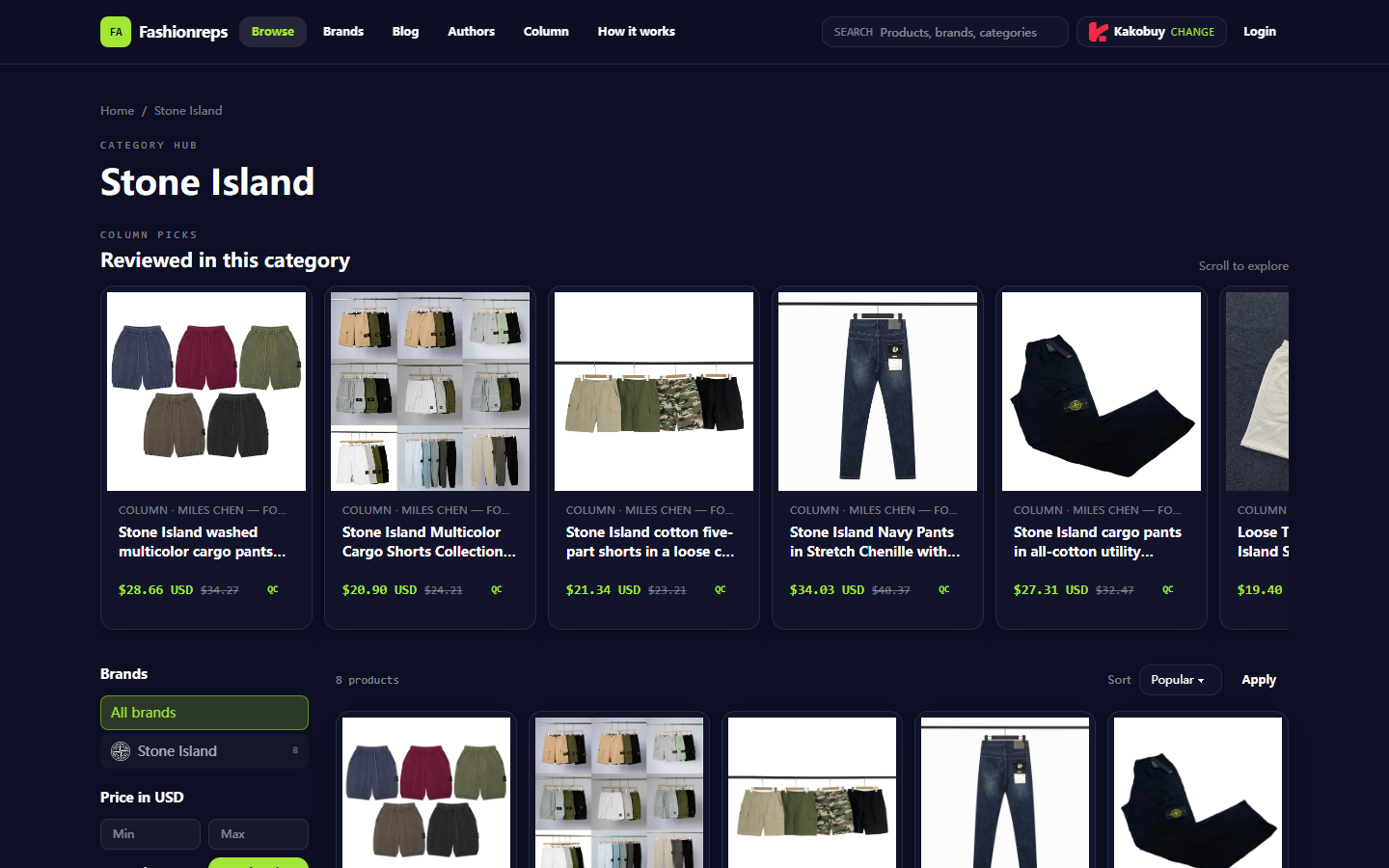
# How to Fix Stone Island Color & Size Info Mismatch  Image: Example of the [Stone Island](https://fashion-reps.net/brand/stone-island) category page on [Fashionreps](https://fashion-reps.net/). The image is only for illustrating the potential hierarchy differences in information among category pages, product cards, and specific variant pages. ## First, Define the Specific
Editor score 4.2 / 5

Image: Example of the Stone Island category page on Fashionreps. The image is only for illustrating the potential hierarchy differences in information among category pages, product cards, and specific variant pages.
First, Define the Specific Manifestation of Stone Island Info Mismatch
This guide addresses a specific issue: When you view Stone Island products on Fashionreps, the color, size, or specifications shown on the page are inconsistent with the main product image, variant options, or seller page, and you are unsure whether to proceed with ordering.
After reading, you should be able to do three things: record the discrepancies, determine at which page level the discrepancy occurs, and pause ordering and seek clarification when necessary. This article does not apply to determining product authenticity, evaluating fabric quality, confirming final inventory, and does not replace the ordering, payment, warehouse, or after-sales rules of the shopping agent. 🧭
Fashionreps pages are primarily for discovering products and viewing organized product information. The page clearly states that the Buy button will redirect to your selected shopping agent; orders, payment, and logistics are handled on the agent's website. Therefore, the information on category pages or product cards cannot automatically be equated with the final purchasable variants on the agent's order page.
Check Style, Color, Size, and Specifications from the Fashion-Replica Product Page
Start by entering the target page from the Fashionreps product card, not relying solely on search results, browser cache, or other people's screenshots. Record the following information:
- Full product title
- Product page URL and time of access
- Color name(s) or number of colors displayed on the page
- Size range displayed on the page
- Clearly identifiable color or style features in the main image
- Color, size, and specifications in the variant selector
- Whether the page shows inventory, sold out, or missing option prompts
- The shopping agent and corresponding product information after clicking Buy
The currently visible Stone Island category page displays multiple product cards and provides reference prices, brand filtering, and size or color-related title descriptions. For example, some card titles state multiple colors, multiple color versions, or S–2XL ranges. However, this information comes from category page visible content and cannot be used to infer that every color and size is still selectable on the specific product page or agent page.
The page also displays multiple shopping agent entry points. After selecting an agent, the purchase button will redirect according to the current selection. Different agent pages may use different variant names, inventory statuses, or specification display methods, so you must maintain the correspondence before and after the redirect when verifying.
Compare Product Main Image, Variant Options, and Page Text to Record Differences
Divide the information into three groups for recording; do not write speculation as fact.
| Check Location | What to Record | What to Do If a Difference Is Found |
|---|---|---|
| Product main image | Main color, color blocking, long/short style, and obvious structure identifiable in the image | Only record visible appearance; do not write image observations as material or physical experience |
| Page text | Title, color name, size range, specification description | Mark words inconsistent with the main image or options, and keep original screenshots |
| Variant options | Actually clickable colors, sizes, and inventory prompts | Treat current selectable options as information to be confirmed; do not assume a size is purchasable just because the title mentions it |
Common situations include:
- The title lists multiple colors, but the variant menu only shows some of them.
- The main image appears dark, but the text uses Navy, Gray, or other color names, making it impossible to confirm the exact color name from the image alone.
- The title lists a larger size range, but the current variant menu is missing some of those sizes.
- The product card uses an old title, but the specific page shows a different style or different variant structure.
- The main image is a schematic, and its color or details cannot represent all options.
When recording differences, it is recommended to use phrasing like "Page text shows...; current options show...; main image can only observe...". This separates page facts, visual observations, and unconfirmed items. 📋
Check Page Update Time, Link Status, and Visible Inventory Prompts
First reload the Fashionreps product page, then check the agent landing page. The verification date is October 9, 2026. Since colors, sizes, inventory, and link status can change, this date only indicates when this verification occurred and does not imply it remains valid thereafter.
Follow this order:
- Confirm the page loads properly, not a 404, blank page, or only category labels.
- Check whether the product title still corresponds to the target Stone Island style.
- Open color and size selections one by one, not just the default options.
- Observe whether options are clickable, and whether sold out, out of stock, unavailable, or missing specification prompts appear.
- Click the currently selected Buy button and confirm the product title and variant information on the agent page.
- Return to the Fashionreps page and confirm that switching agents has not changed the current record subject.
- Save screenshots containing page title, color, size, time, and address bar.
Do not treat reference prices as the final payment amount. The category page example shows reference prices in USD and previous reference prices, but these figures cannot represent the agent's final product price, service fees, domestic shipping, international shipping, taxes, or after-sales costs. 💰
If the link redirects, the page only shows images, the product name disappears, or the variant selector fails to load properly, record the status as "currently unable to complete verification" rather than filling in color, size, or inventory information on your own.
Which Differences Require Contacting the Site or Seller for Confirmation
Situations suitable for contacting confirmation include:
- Fashionreps title, main image, and variant options each point to different colors.
- The size range shown on Fashionreps is significantly different from the selectable sizes on the agent page.
- After clicking Buy, the agent page shows a different product title or different style image.
- Color or size options exist but without clear inventory status.
- After page updates, old prices, old titles, or old images remain, making it impossible to determine which is current.
- The variant menu displays overly simplified names that cannot confirm the specific color in the main image.
When contacting, send only necessary information: product page URL, product title, color and size, verification time, screenshots of differences, and the specific question you want confirmed. Do not publicly share order numbers, full shipping labels, payment cards, passports, or other personal information.
Questions can be specific, for example: "The Fashionreps product title lists multiple colors, but after entering the agent page, only some colors are shown. Please confirm the currently available color names and corresponding sizes, and whether there is inventory information based on current options."
Fashionreps can only confirm the information currently visible on its pages. Inventory, order payment, warehouse inspection, returns, and logistics issues should be handled through the official support channels of the shopping agent you are redirected to. Do not treat category page content or community discussions as the agent's formal confirmation of an order. 📨
When to Pause Ordering and Keep Screenshot Evidence
It is recommended to pause ordering when any of the following occurs:
- The color cannot be clearly matched among the main image, page text, and variant options.
- The target size does not appear in the operable variant menu.
- The product on the agent page does not have the same title or style as on the Fashionreps page.
- The page shows contradictory options under different refreshes or different entry points.
- The page cannot be opened, or key specifications only exist in expired screenshots.
- You must rely on unconfirmed seller explanations to decide which color or size to select.
Screenshots should at least retain: page title, color or size options, visible inventory prompts, verification date and time, and address bar. Before taking screenshots, cover personal accounts, order numbers, payment information, and full shipping address, but do not block product names, variant names, or inventory prompts.
Do not repeatedly submit orders, repeatedly click payment, or repeatedly generate the same requests just for testing. Without confirmed information, continuing to operate will not resolve the factual conflicts on the page; it may only complicate refunds, style changes, or after-sales handling. ⛔
How to Separate Page Facts, Community Feedback, and Editorial Judgment
This article only uses the provided Fashionreps category page content as a page sample. That page shows the Stone Island category, product cards, reference prices, brand filters, and shopping agent entry points; it cannot prove that a specific color, size, or inventory is currently available.
If community feedback is used to assist judgment, it should only be treated as a lead to be verified. A single comment, single screenshot, or old post cannot replace the variant information on the current product page and agent page. If the full context of a discussion cannot be read, its statements should not be generalized into universal conclusions.
Editorial judgments should be clearly marked as judgments, for example:
- "It is recommended to first check the agent page" is a risk control suggestion, not a product fact.
- "The main image alone cannot prove the color name" is an informational judgment, not a test conclusion about the physical product.
- "Pause ordering when pages show discrepancies" is an operational suggestion, not implying that Fashionreps has malfunctioned.
This article does not claim that Fashionreps currently has a system fault, nor does it claim that any Stone Island product is sold out, definitely in stock, authentically material, or accurately sized. 🧩
Next Actions After Completing Stone Island Info Verification
If the three sources of information correspond:
- The color names in page text, main image, and variant menu are basically consistent;
- The target size appears in the operable options;
- The agent page still corresponds to the same product;
- The current price, inventory, and purchase conditions have been confirmed on the agent page;
You can proceed to the next step, place an order according to the actual options on the agent page, and keep verification screenshots.
If only some information corresponds, contact the Fashionreps page maintainer or the relevant shopping agent for confirmation first; do not guess and select similar colors or adjacent sizes.
If the discrepancy cannot be explained, the link is invalid, the target size does not exist, or the agent page corresponds to a different product, the safest action is to stop ordering, save evidence, wait for confirmation, or choose a product with more complete information.
This approach does not save a fixed amount of money; it reduces the costs of style changes, returns, domestic returns, or reordering caused by selecting the wrong color or size. The cost is the time needed to re-verify and possibly abandon the current link; it is suitable for buyers who value variant accuracy and need to retain purchase evidence, and not suitable for those who are eager to order and unwilling to wait for inventory or specification confirmation.
Article Image
